December 13, 2025
.webp)

Mastering Social Media Management for Your NZ Business
A practical guide to social media management for NZ businesses. Learn to build a strategy, create engaging content, and measure results that matter.
Career Development
minutes
Mastering Social Media Management for Your NZ Business
So, what exactly is social media management? It's the whole shebang: creating, scheduling, analysing, and engaging with content across your social platforms to hit your business goals. For a Kiwi business, it's way more than just posting a few nice photos. It's about strategically connecting with your local community to drive actual, tangible results.
Building Your Social Media Foundation in New Zealand

Diving into social media without a proper plan is a bit like setting sail from Auckland Harbour without a map. Sure, you might drift around and enjoy the view for a bit, but you’ll never actually get where you want to go. A solid foundation makes sure every post, story, and comment you share has a clear purpose.
This initial planning stage is the one everyone wants to skip, but it's easily the most critical part of managing your social media well. It’s what turns your online activity from a time-sucking chore into a seriously powerful tool for growing your business.
Defining Your Business Objectives
First things first, you need to be crystal clear on why you're even on social media. It’s easy to get caught up chasing vanity metrics like likes and followers, but let's be honest, they don't pay the bills. Your social media goals need to be directly linked to real business outcomes.
Start by asking yourself what you truly want to achieve. Are you trying to:
- Increase brand awareness? This is a great starting point for new businesses trying to get their name out there in a specific town or region.
- Generate leads and sales? This is all about driving traffic to your e-commerce site or getting more enquiries for your service-based business.
- Drive foot traffic to a physical location? A cafe in Wellington or a retail shop in Christchurch would have this as a top priority.
- Build a loyal community? This focuses on creating a space where your customers can connect with your brand and with each other.
Picking one or two main goals will help you focus your energy where it counts. For instance, a local plumber’s goal might be "generate five new quote requests per week through Facebook." That's way more powerful than just "get more likes." This is how you make social media an integrated part of your bigger picture, not just an afterthought. For a deeper dive, check out our guide on effective small business marketing strategies.
Understanding Your Kiwi Audience
You can’t have a decent conversation if you don’t know who you’re talking to. Creating detailed customer profiles, or personas, is absolutely essential if you want to create content that actually lands with people. Don't just make assumptions—dig into your existing customer data and do a bit of market research.
Think about the basics like age and location (are they in rural Waikato or urban Auckland?), but then go deeper into their mindset:
- What are their hobbies and interests outside of your business?
- What problems are they facing that you can help solve?
- Which social media platforms are they really spending their time on?
Key Takeaway: A persona for a Kiwi farming supplies company might be "Dave, a 45-year-old dairy farmer in Taranaki who checks Facebook for weather updates and community news after morning milking." Getting this specific helps you create content that speaks directly to Dave, not just some generic customer.
And the opportunity here in New Zealand is huge. In 2025, social media use is through the roof, with about 95% of Kiwis aged 15 and older active on at least one platform. With Facebook and YouTube leading the charge, you have a direct line to your customers if you just take the time to understand their online habits.
Analysing Your Local Competitors
Finally, have a good nosey at what your competitors are up to online. The idea isn't to copy them, but to spot gaps and find opportunities. A simple competitive analysis is all you need—just look at two or three of your local rivals. Make a few notes on their strengths, weaknesses, and the kind of stuff they're posting.
This little bit of homework will help you find your unique angle. Maybe you’ll notice all your competitors are super corporate and formal; that's your chance to be the friendly, behind-the-scenes voice. Perhaps they only ever post salesy content; you can stand out by sharing genuinely helpful tips and advice. To get a handle on all this and keep things streamlined, looking into some essential social media management tools can make a world of difference.
Laying the Groundwork: A Content Strategy That Clicks With Kiwis
Think of your social media feed as your digital shop window. Is it interesting? Is it helpful? Or is it just covered in "buy now" signs? A smart content strategy makes sure your window is always inviting, showing off the best of what you do without constantly shouting for a sale. This is the secret to social media management that doesn't just save you time but actually builds real connections with your customers.
At the heart of any great social media presence is a solid content marketing strategy. For a deep dive into the broader topic, this essential content marketing strategy guide is a fantastic resource. But for now, let's bring it right back home and focus on what works here in New Zealand.
Finding Your Core Content Pillars
First things first, you need to establish your content pillars. These are simply three to five core topics or themes your business can talk about, day in and day out. They need to be broad enough that you'll never run out of ideas, but specific enough that they tie directly back to what you offer and what your Kiwi audience actually cares about.
Pillars give your content a backbone. They stop you from staring at a blank screen every morning, wondering what on earth to post. Everything you create will have a purpose, reinforcing who you are as a brand.
Let's imagine a Kiwi electrician in Hamilton. Their pillars might look something like this:
- DIY Electrical Safety Tips: Simple, practical advice for homeowners to keep them safe.
- A Day in the Life: Showing the team out on jobs, introducing a new apprentice—basically, putting a human face to the business.
- Project Showcase: High-quality photos and videos of finished work, from residential new-builds to commercial LED upgrades.
- Local Community Shout-Outs: Tagging the local builders, plumbers, and cafes they work with and love.
This mix does more than just sell their services. It provides genuine value, builds trust, and cements their reputation as a knowledgeable, community-focused local expert.
Creating a Content Calendar That Actually Works
Once you've got your pillars sorted, a content calendar becomes your new best friend. Seriously, it's a game-changer for staying organised. This doesn't need to be some fancy, expensive software—a simple spreadsheet or even a wall planner can do the job perfectly. The whole point is to plan your posts ahead of time, making sure you've got a healthy mix of content going out.
A great rule to follow is the 80/20 rule. Aim for 80% of your content to be valuable, entertaining, or educational for your audience. The other 20% can be your more direct, promotional stuff. This balance is key to keeping people engaged instead of making them feel like they're just being sold to all the time.
Pro Tip: Don't just plan what you'll post, plan the format too. A week's plan could feature one quick video (like an Instagram Reel), two sharp photos, a customer story, and a link to a helpful blog on your site. Keeping things varied is what makes a feed feel fresh and interesting.
Planning ahead turns social media from a frantic, daily chore into a calm, strategic part of your marketing. When you know what's coming up, you can batch-create your content and free up precious headspace for everything else on your plate.
Here's a quick look at how a content calendar could work in practice. This simple schedule shows how a local cafe could use its content pillars to plan a week of interesting posts that go far beyond just "coffee of the day."
As you can see, a structured plan ensures every day has a purpose, providing a mix of content that builds community, educates, and gently promotes the business.
Keep Them Hooked by Mixing Up Your Formats
To keep your audience engaged, you have to switch up your content formats. People consume content differently—some love video, others prefer to swipe through photos. Plus, platforms like Instagram and TikTok are massively prioritising certain types, especially short-form video.
Here are a few formats you should be weaving into your calendar:
- Short-Form Video (Reels/Shorts/TikToks): Absolutely perfect for quick tips, behind-the-scenes action, or satisfying before-and-after transformations. These are gold for reaching new people because they're so easily shareable.
- High-Quality Images: A non-negotiable for showing off your products, your team, or your amazing work. Never underestimate the power of a crisp, well-composed photo.
- User-Generated Content (UGC): Sharing photos, reviews, or testimonials from happy customers is pure marketing magic. Just make sure you get their permission first! It's powerful social proof that builds trust like nothing else.
- Carousels/Slideshows: These are great for breaking down a big topic into bite-sized chunks, telling a step-by-step story, or sharing a list of helpful tips.
By diversifying your formats, you're not just playing to the algorithm's strengths; you're making sure there's something for everyone in your audience. This variety also helps reinforce your brand's personality, making it more memorable. It’s a crucial piece of the puzzle, which we touch on more in our guide on the fundamentals of naming and branding your business. A strong brand voice, backed up by a smart mix of engaging content, is a combination that’s hard to beat.
Creating and Scheduling Content Like a Pro
Having a brilliant content strategy is one thing, but consistently bringing it to life is where the real work begins. The good news? You don’t need a fancy design studio or a massive budget to create slick, engaging content. It’s all about finding user-friendly tools and adopting a smarter workflow.
This whole process is about turning your content pillars and calendar into actual posts—without it taking over your entire week. Let's be honest, execution is everything. Streamlining it means you can get back to the bigger picture of running your business.
This simple workflow shows the journey from a broad idea to a varied, interesting content mix.
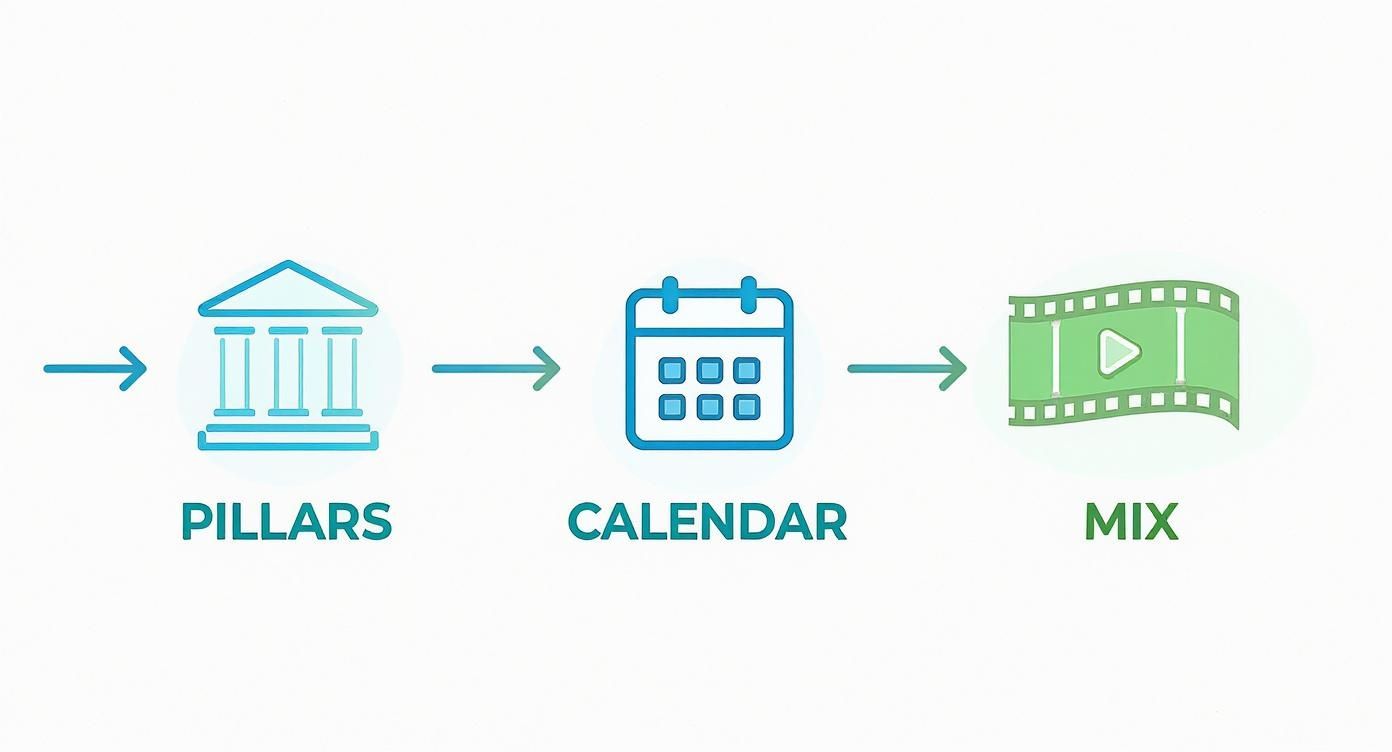
As you can see, your core pillars feed into a structured calendar, which then dictates the mix of formats you'll use to keep your feed fresh and engaging.
Easy-to-Use Tools for Content Creation
Forget complicated software with a steep learning curve. There are some amazing tools out there—many of them free or low-cost—that let you create professional-looking graphics and videos right from your phone or computer.
- For graphics: A tool like Canva is an absolute game-changer for small businesses. It has thousands of templates already sized for Instagram stories, Facebook posts, and more. You can easily drop in your logo and brand colours to keep everything looking consistent.
- For video editing: You don't need to be a filmmaker. Apps like CapCut or even the built-in editor on Instagram Reels make it incredibly simple to trim clips, add text, and use trending audio.
The trick is to find one or two tools you feel comfortable with and stick to them. This will speed up your creation process massively over time.
The Power of Content Batching
One of the most effective habits you can build is content batching. Instead of scrambling to create a post every single day, you set aside a dedicated block of time—say, two hours every Monday—to create all your content for the entire week ahead.
This approach saves an incredible amount of time and mental energy. By focusing on one task, you get into a creative flow state and produce higher-quality work far more efficiently. Batching also ensures your content calendar is always full, so you never miss a posting day.
A Real-World Example: Imagine a local landscape gardener. They could spend a Sunday afternoon visiting a few recent projects. In just a few hours, they could take photos, film short video clips of the finished gardens, and maybe even get a quick testimonial on video. Boom—they've just gathered enough raw material for weeks of high-quality posts.
Choosing the Right Scheduling Platform
Once your content is created, scheduling tools are your secret weapon for consistency. They automatically publish your posts at the times you choose, meaning your social media presence keeps working for you even when you’re busy on a job or taking a well-deserved break.
There are several great options popular with NZ businesses:
- Meta Business Suite: This is Facebook and Instagram’s free, built-in tool. It’s perfect for getting started, allowing you to schedule posts, stories, and reels directly to both platforms while also giving you basic analytics.
- Later: Known for its visual planner, Later is fantastic for Instagram-focused brands that really care about their feed's aesthetic. You can literally drag and drop posts to see how they’ll look together.
- Buffer: A clean, straightforward scheduler that supports a wide range of platforms beyond just Meta. Buffer is great for businesses looking to manage a presence on LinkedIn or Pinterest as well.
Automating your posting schedule frees you up to focus on what really matters: engagement. With the average time New Zealanders spend online now around three hours daily, being present to interact is crucial. Younger Kiwis are especially active—a huge 67% of 18-29 year olds spend four or more hours online, so scheduling helps you be there when they are. You can check out the full findings on New Zealand's online habits from InternetNZ.nz.
Building these practical skills is incredibly valuable, which is why we offer a range of digital marketing classes designed for Kiwis ready to take control of their online presence.
Turning Followers Into a Thriving Community

Let's be honest, social media management is far more than just broadcasting your message into the void. It’s a conversation. Once you’ve got a steady rhythm of content going out, the real magic begins when you stop chasing follower numbers and start building a genuine community.
This is the point where your audience stops being a group of passive scrollers and transforms into active supporters—even advocates—for your business. It's all about creating a space where people feel seen, valued, and connected to your brand on a much more personal level.
Mastering the Art of Engagement
At its heart, community management is really just about interaction. It means showing up, listening, and actually participating in the conversations happening around your posts. This consistent effort is what signals to your audience, and just as importantly, to the platform's algorithm, that your account is alive and valuable.
But what does good engagement actually look like day-to-day? It’s definitely more than a quick 'like' on a comment.
- Respond thoughtfully. If someone takes the time to leave a detailed comment, give them a proper reply. Acknowledge what they've said, answer their question, or thank them specifically for their feedback.
- Ask questions. Don't just post and ghost. End your captions with open-ended questions that invite a response. Think "What's your favourite weekend walk in the Waikato?" rather than just making a statement.
- Spark conversations. Use the interactive features the platforms give you, like polls or "this or that" questions in your Instagram Stories. They're super low-effort ways for people to engage and they give you brilliant insights into what they like.
This isn’t just about being friendly for the sake of it—it has a direct impact on your visibility. Studies have shown that simply replying to comments can boost your engagement by anywhere from 5% to 42%, depending on the platform. The more you interact, the more your content gets shown to others. Simple as that.
Defining Your Brand Voice
To build a real connection, your brand needs a bit of personality. Your tone of voice is how that personality shines through in your writing. Are you witty and a bit cheeky, professional and authoritative, or warm and super friendly?
There's no right or wrong answer here, but it absolutely must be authentic to you and resonate with your target Kiwi audience. A boutique clothing store in Ponsonby is going to sound very different from a rural fencing contractor in Southland, and that's exactly how it should be.
Key Takeaway: Consistency is everything. If your posts are funny and casual but your comment replies are stiff and corporate, it creates a jarring disconnect. Your voice needs to be the same across every single touchpoint, from your captions right down to your direct messages.
Once you’ve nailed down your voice, stick with it. It makes your brand more relatable and memorable, helping you stand out in an incredibly crowded feed.
Handling Negative Feedback Like a Pro
It's going to happen. Sooner or later, you'll get a negative comment or a complaint. It can be tempting to just delete it or get defensive, but how you handle this moment is a massive opportunity to show off your professionalism and commitment to customer service.
A negative comment isn't just a problem; it's your chance to turn an unhappy customer into a loyal one and show everyone else watching that you actually care.
Try following this simple framework:
- Acknowledge and validate. Start by showing you've heard them. A simple, "Thanks for getting in touch, we're really sorry to hear you had this experience," goes a long way.
- Take it offline. The last thing you want is a public back-and-forth. Give them a clear path to sort it out privately. "Could you please pop us a DM with your contact details so our team can look into this for you?"
- Follow up. After you've resolved the issue behind the scenes, you might want to reply to the original comment to close the loop. "Hi again, just confirming we've connected via DM and are working on a solution."
This calm, professional approach not only deals with the immediate issue but also builds incredible trust with your wider audience. They can see that you take feedback seriously and are committed to making things right. This kind of responsive, responsible attitude is a cornerstone of great social media management.
Right, let's talk about putting some money behind your social media.
Getting Started With Paid Social Media Ads
Relying purely on your organic posts to find an audience feels a bit like yelling into the wind these days. It’s getting tougher. The great news is that even a tiny ad budget can give your Kiwi business a massive leg up, pushing your content right in front of the people you actually want to see it.
And forget all the noise about complicated sales funnels and intimidating ad managers. We're keeping it simple and starting with the basics: ‘boosting’ your best posts on platforms like Facebook and Instagram to get more eyes on what you’re doing.
Setting a Realistic Budget and Clear Goals
The first question I always get is, "How much should I actually spend?" And the answer is refreshingly simple: start small. You really don't need a huge budget to see what works.
Even $10-$20 to boost a single post can make a world of difference to its reach.
But before you spend a single dollar, you need to be crystal clear on what you want that ad to do. What's the goal? Are you aiming for:
- More engagement? You’re chasing likes, comments, and shares to build a bit of buzz and social proof.
- More website visits? The goal is to get people off social media and onto a specific product page or blog post on your site.
- More messages? You want to kickstart conversations with potential customers right in their DMs.
Nailing down a specific goal isn't just a 'nice to have' – it tells the platform how to optimise your ad and gives you a clear way to measure if your money was well spent.
A classic mistake is boosting a post just for the sake of it. Always, always tie your ad spend to a specific, measurable outcome. This simple shift changes your mindset from "spending money" to "investing in a result."
Targeting the Right Kiwi Audience
Here’s where paid ads really come into their own. The targeting capabilities are incredible. Instead of shouting at a crowd, you can whisper directly into the ear of your perfect customer.
When you're setting up your audience, think beyond the basics like age and gender. Get specific to New Zealand. For instance, if you run a sustainable goods store in Auckland, you could target:
- Location: People living within a 15km radius of Auckland.
- Age: 25-45.
- Interests: People who have shown an interest in pages related to sustainable living, organic food, and eco-friendly products.
This level of detail means your ad budget isn't wasted on people who will never be interested. Every dollar goes towards reaching someone who might genuinely love what you offer.
A Real-World Boosted Post Example
Let’s bring this to life. Imagine a local Queenstown photographer who wants to promote their wedding packages. They’ve just posted a stunning gallery of photos from a recent wedding at Lake Hayes. Instead of just letting it sit there, they decide to boost it with a $30 budget over three days.
Their goal is simple: get more inquiries.
So, they target women aged 28-38 in the Otago region who have shown an interest in topics like "wedding planning," "engagement rings," and "wedding dresses."
After the three days are up, they pop into their results and see a few key numbers:
- Reach: How many unique people saw the ad. Let's say it reached 5,000 people.
- Engagement: The total likes, comments, and shares. It got 350 engagements.
- Cost Per Result: Since their goal was inquiries, they count how many messages they received. If they got 5 inquiries, their cost per result is $6.
That simple breakdown tells them exactly what they got for their money. Now they have real data to decide whether to run similar ads, maybe tweaking the audience or the image next time. It's all about experimenting and refining.
The ad market here is growing fast. In fact, New Zealand's social media ad market is projected to hit around US$459.46 million in 2025, with platforms like YouTube reaching over 88.7% of the adult population. You can read more about NZ's social media landscape and its potential to see just how big the opportunity is.
Measuring Performance to Improve Your Strategy
Alright, so you’re creating and posting content. Fantastic. But that’s only half the job. The real magic, the part where you actually start seeing meaningful growth, comes from understanding what’s working and what isn’t. This is where we talk about measurement.
Now, don't let the word "analytics" scare you off. This doesn’t have to be a deep dive into confusing charts and endless spreadsheets. At its core, it's just about asking one simple question: are my efforts actually helping me reach my goals?
By keeping an eye on a few key numbers, you can stop guessing and start building a clear, data-backed plan. This is how you make your social media smarter, not just louder.
Choosing the Right Key Performance Indicators
The metrics you track have to link directly back to the business goals you set at the start. It’s a classic mistake to chase vanity metrics—numbers that look good on paper but don't actually help your business. If your goal is to build brand awareness, then obsessing over link clicks is a waste of your time.
Here’s a straightforward way to connect your goals to the right numbers, or Key Performance Indicators (KPIs) as they’re known in the biz:
- Goal: Brand Awareness. Your go-to KPIs are Reach (the number of unique people who see your content) and Impressions (the total times your content was shown). These tell you how far your message is spreading.
- Goal: Engagement. Here, you’ll focus on Likes, Comments, Shares, and Saves. These are the juicy metrics that show people are genuinely connecting with what you’re putting out there.
- Goal: Website Traffic. The only number that really matters here is Link Clicks. Simple as that. It tells you how good you are at getting people from social media over to your website or online shop.
- Goal: Lead Generation/Sales. Now we’re talking Conversions. This is a bit more advanced and usually needs a tracking pixel (like the Meta Pixel) set up on your site. It tracks how many people take a specific action, like filling out a contact form or buying something, after seeing your post or ad.
Where to Find and Understand Your Data
You don't need to pay for fancy tools to get started. Every major platform has its own free, built-in analytics dashboard that gives you all the essential info you need.
On Facebook and Instagram, you'll find this under "Insights" or the "Professional Dashboard." When you look at how your posts are performing, don’t just glance at the likes and move on. Dig a little deeper. The platform will show you how many people you reached, whether they were existing followers, and how many were brand new to you. This stuff is gold for figuring out what kind of content pulls in a fresh audience.
Pro Tip: At the end of each month, look for patterns in your top-performing posts. Is there a common theme? Maybe videos are knocking it out of the park compared to photos. Perhaps posts that ask a question are sparking way more comments. These patterns are your roadmap for creating more of what your audience genuinely loves.
Creating a Simple Monthly Report
To make this whole process manageable and not a massive chore, whip up a quick, simple report at the end of each month. This isn’t about creating a slide deck for a board meeting; it’s a personal check-in to keep you on the right path. A basic spreadsheet is perfect.
Here’s what you should track:
- Follower Growth: How many new followers did you get this month?
- Top 3 Posts: Make a note of your best posts based on your main goal (e.g., the 3 posts with the most reach, or the most link clicks).
- Key KPI Totals: Jot down your total reach, impressions, and engagement for the month.
- Notes & Actions: This is the most important part. Briefly write down what you learned. Something like, "Reels showing the behind-the-scenes of our candle-making got heaps of engagement. Plan to do two more next month."
This simple habit is the final, crucial piece of the puzzle. It closes the loop, turning your past efforts into valuable lessons that sharpen your future strategy. By consistently measuring and tweaking your approach, you ensure your social media presence keeps evolving and delivering real results for your business.
Got Questions About Social Media Management?
When you're knee-deep in running a Kiwi business, it's natural for questions about social media to pop up. Let's tackle some of the most common ones we hear from founders and side-hustlers just like you.
How Often Should a Small Kiwi Business Actually Post?
Honestly, there's no single magic number here. The golden rule is consistency over frequency.
For platforms like Facebook and Instagram, a good rhythm to aim for is 3-5 high-quality posts per week. It's far better to share something genuinely valuable a few times a week than to spam your audience with daily fluff that doesn't help them. Quality always wins.
Which Social Media Platform Is Best for My Business in NZ?
This all comes down to one thing: where are your customers hanging out online? Don't try to be everywhere at once. Instead, focus your energy where it'll have the most impact.
- Facebook is the all-rounder. It has a massive user base across almost every age group in New Zealand, making it a safe bet for many.
- Instagram is your go-to for anything visual. If you're selling products or a lifestyle, and your audience is on the younger side, this is your playground.
- LinkedIn is non-negotiable for any business that sells to other businesses (B2B). It's the professional hub, period.
My advice? Pick one platform where you know your customers are active and absolutely nail it first. Once you've got a smooth system running there, then you can start thinking about expanding your empire to other channels.
Do I Really Need to Pay for Social Media Ads?
While you can definitely get by without spending a cent, I'd strongly recommend it if you're serious about growth. The days of massive free reach are long gone on most platforms.
Putting even a small budget behind your posts—think $10-$20 per week—can make a world of difference. It helps you break through the noise and connect with a targeted local audience you simply wouldn't find otherwise.
Ready to stop guessing and start managing your social media with confidence? Prac Skills offers a bunch of practical, online courses designed specifically for the NZ market. We're here to help you turn your passion into a thriving business or side hustle. Check out our courses and build the skills you need today at https://www.pracskills.co.nz.